| Lesson 6 | Global catalog server |
| Objective | Describe the global catalog and the global catalog server in Active Directory |
Global Catalog and Global Catalog Server in Active Directory
In an Active Directory forest, users and applications frequently need to locate objects that may exist in other domains
(for example, users, groups, printers, or shared resources). The Global Catalog (GC) exists to make those
forest-wide searches fast and predictable.
To avoid confusion:
To avoid confusion:
- Global Catalog = the searchable dataset and service that enables forest-wide lookup.
- Global Catalog server = a domain controller that is configured to host the Global Catalog role.
What the Global Catalog stores
A Global Catalog server stores:
- a full, writable replica of its own domain partition (all objects and all attributes for that domain), and
- a partial, read-only replica of every other domain in the forest.
That partial replica is based on the schema’s Partial Attribute Set (PAS), which contains the attributes that are most commonly used in searches (for example, name and logon-related attributes). The PAS can be adjusted in the schema, but changes should be made carefully because they can increase replication traffic and database size.
Note on application directory partitions: objects stored in application partitions are not included in the Global Catalog partial replica by default, so a GC search will not return those objects unless you query the appropriate partition directly.
Assigning Global Catalog servers in a single-domain environment
In a single-domain forest, a Global Catalog server is often less critical for logon than it is in a multi-domain forest.
However, clients still benefit from Global Catalog placement because directory searches are faster and the environment is more
scalable if additional domains are introduced later.
Steps to assign a domain controller as a Global Catalog server:
In a single-domain forest, a GC is generally not required to process a basic user logon request. In a multi-domain forest, GC availability becomes far more important because universal group membership evaluation and UPN logons depend on GC data.
Steps to assign a domain controller as a Global Catalog server:
- Open Active Directory Sites and Services (run
dssite.msc). - Expand Sites → your site → Servers → the target server.
- Select NTDS Settings, right-click, choose Properties.
- Check Global Catalog, then click OK.
- Allow replication to complete and validate health (for example, using
repadmin).
- At least one Global Catalog server per major site is a common baseline when sites are used.
- Use more than one GC per site when query volume or resiliency requirements justify it.
- Balance performance against cost: GC placement increases replication scope compared to a standard DC.
In a single-domain forest, a GC is generally not required to process a basic user logon request. In a multi-domain forest, GC availability becomes far more important because universal group membership evaluation and UPN logons depend on GC data.
How clients find Global Catalog servers
Clients typically locate the best Global Catalog server through DNS SRV records that are registered by GC-hosting domain controllers (including site-specific records so clients can choose a nearby GC).
You can query SRV records to discover GC servers in a forest. For example, the SRV locator for the GC service is commonly exposed under:
Global Catalog service ports:
You can query SRV records to discover GC servers in a forest. For example, the SRV locator for the GC service is commonly exposed under:
gc._msdcs.example.com
Use tools such as nslookup (classic) or PowerShell Resolve-DnsName (modern) to enumerate these records.
Global Catalog service ports:
- 3268 = Global Catalog (LDAP)
- 3269 = Global Catalog (LDAPS / TLS)
How the Global Catalog improves forest-wide searches
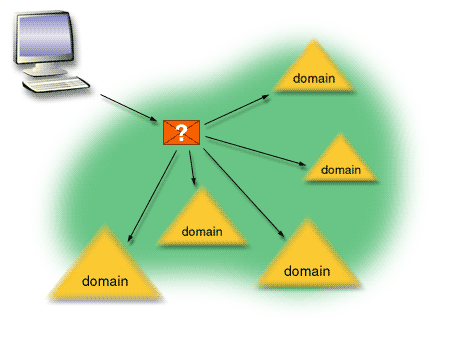
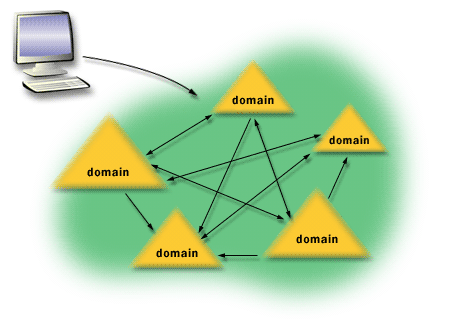
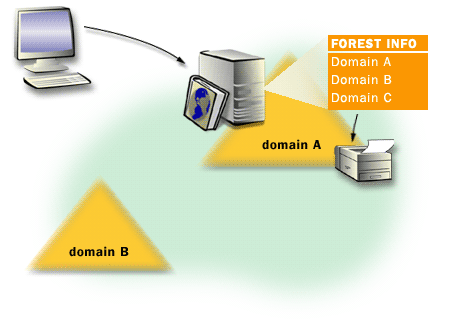
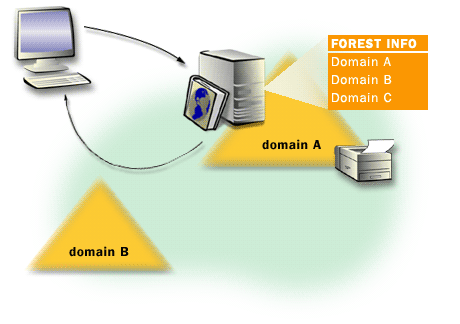
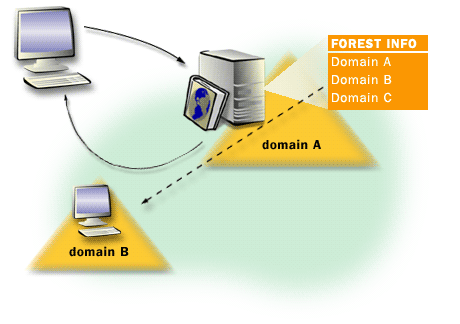
Without a Global Catalog server, many forest-wide searches must be forwarded to multiple domains to locate the authoritative domain partition
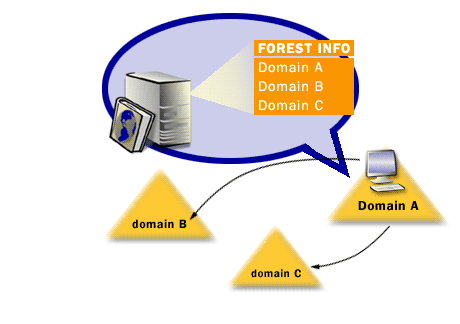
for each object. With a GC, common attributes for objects across the forest are available in one place, which significantly reduces cross-domain
traffic and improves response time for users and applications.
The slide show below illustrates the difference between:
The slide show below illustrates the difference between:
- a forest-wide search performed without GC assistance, and
- the same search resolved efficiently using a Global Catalog server.
Global Catalog and user logon behavior
Global Catalog servers influence logon behavior primarily in multi-domain forests:
User Logon Global Catalog - Domain Controller
- UPN logons ([email protected]) commonly rely on GC lookup to locate the user object across the forest.
- Universal group membership data is evaluated using GC information, which affects authorization after authentication.
User Logon Global Catalog - Domain Controller
Cost and sizing considerations
Because a Global Catalog server holds partial replicas from other domains, it generally incurs more replication scope than a standard domain controller.
For that reason, you should treat GC placement as a performance and resiliency decision:
- Use one GC per site when sites are meaningful and cross-site latency exists.
- Add more GCs when query volume, authentication load, or availability requirements justify it.
- Avoid making every DC a GC by default unless your topology and bandwidth support the additional replication scope.
[1] Forests: Two or more domain trees which do not share a contiguous namespace can be joined in a forest. Domains within a forest share two-way transitive trust relationships and share a common schema and global catalog.
[2] LDAP (Lightweight Directory Access Protocol): LDAP is an open, cross-platform protocol used to query and authenticate against directory services.